Telegram bot that watches your server
vpsbot-tg
A read-only Telegram bot that keeps an eye on a VPS. Ask it for /health, /logs, or /sites, and it pushes an alert when an app crashes, a certificate is about to expire, or something on the box looks like an intrusion.
- Ownership
- Personal work
- Organisation
- Open-source project
- My role
- Sole author
- Status
- Open source, Oct 2026
- Python
- Bash
- systemd
- Telegram Bot API
- Linux
Overview
I run my own apps on a VPS, including this portfolio. Monitoring services either want a monthly fee or an agent with far more access than I'm comfortable giving them. Telegram was already on my phone.
vpsbot-tg is the result: paste one install command, paste a bot token, send the bot one message, and the server starts reporting to you. It auto-detects what you run (PM2 apps, Docker, nginx sites, Let's Encrypt certificates) and only shows sections for things that exist.
Role and ownership
What I personally did
- Telegram bot with long-polling, alert state tracking, and a watchdog.
- Root-owned, read-only query helper that the bot can only reach through one sudo rule.
- Health, PM2, Docker, nginx site, certificate, SSH, and file-integrity checks.
- One-line installer that sets up the service user, sudo rule, systemd unit, and chat pairing.
Constraints
- A chat bot with access to a server is a security risk in its own right. A hijacked Telegram account must not be able to change anything.
- No open ports and no extra infrastructure: the server should only make outbound HTTPS calls.
- Install must be one command on a fresh Ubuntu box, with nothing beyond Python 3.8 and the standard library.
- Alerts have to be worth reading. A noisy bot gets muted, and then it's useless.
Solution
The bot runs as its own system user with no login shell, no home directory, and no access to app files. Its only privilege is one sudo rule for a root-owned helper that runs a fixed set of read-only commands, accepts arguments from a strict character set, and redacts secrets like tokens and database URLs from log output.
A monitor loop checks the server every minute and HTTPS sites every five. Each alert fires once and sends a ✅ when it clears, and sites must fail twice before they count as down. On top of uptime, it watches for intrusion signs: changes to cron, systemd units, sudoers and SSH config, new listening ports, executables in temp directories, and every SSH login.
The bot only answers the one chat that paired with it during install. Anyone else is ignored, and you're told they tried.
Talk to the bot
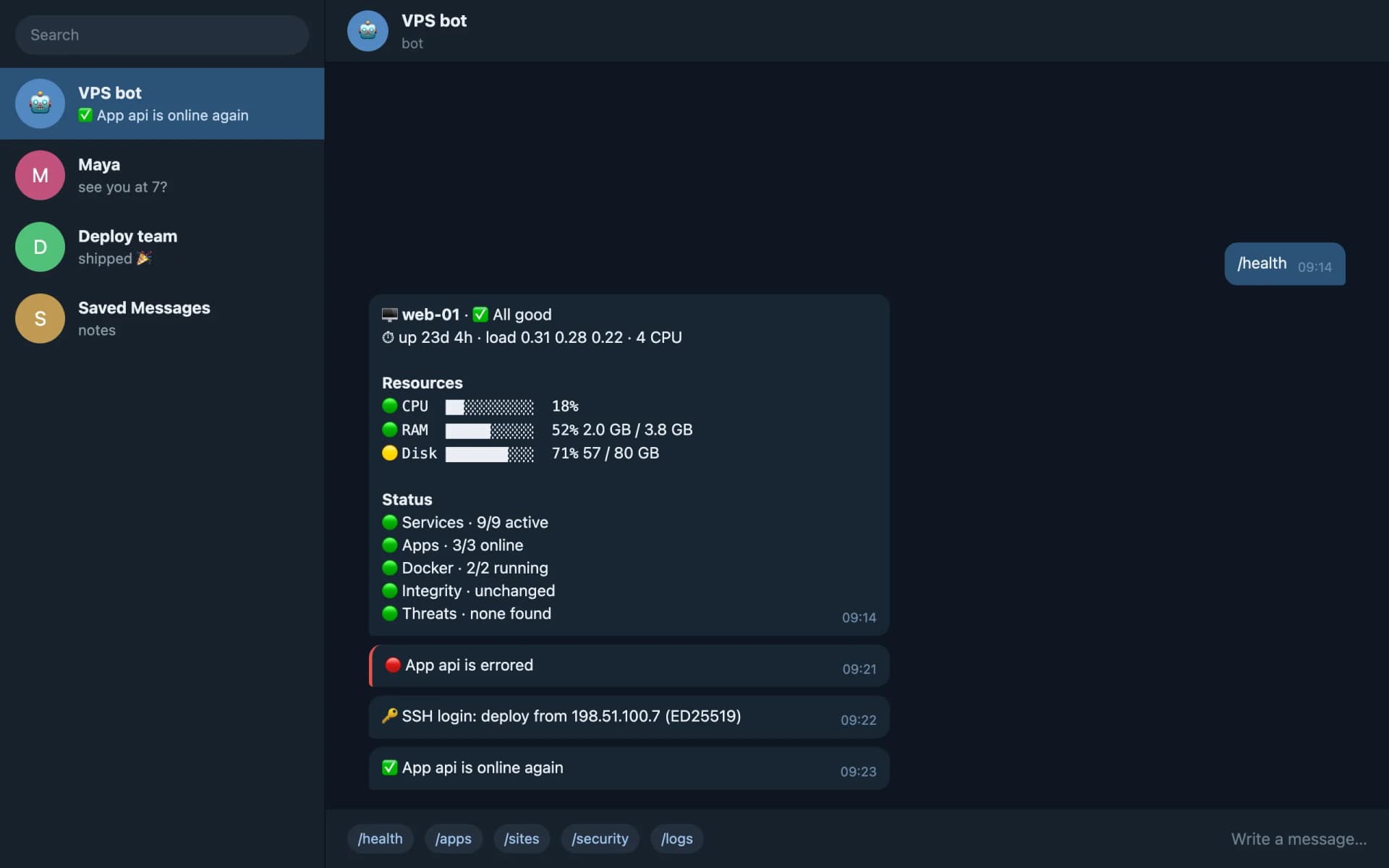
VPS bot
bot · read-only
- 🟢 VPS bot online. /help
- /health
- 🖥 web-01 · ✅ All good⏱ up 23d 4h · load 0.31 0.28 0.22 · 4 CPUResources🟢
CPU ██░░░░░░░░ 18%🟢RAM █████░░░░░ 52%2.0 GB / 3.8 GB🟡Disk ███████░░░ 71%57 / 80 GBStatus🟢 Services · 9/9 active🟢 Apps · 3/3 online🟢 Docker · 2/2 running🟢 Integrity · unchanged🟢 Threats · none found
Ask it
Or cause trouble on the server
A replay using the bot's real message formats. The server, apps and addresses are made up.
Your phone
Telegram
Only the paired chat is answered
Bot
bot.py
User vpsbot: no shell, no home
Monitor loop
Every minute, alerts fire once
Privilege boundary
One sudo rule
sudo -n vpsbot-query <command>
Root helper
vpsbot-query
Fixed read-only commands
Redaction
Secrets stripped from logs
Key decisions
Split the bot from its privileges
Health checks need root to read journals, PM2 state for every user, and protected files.
- Considered
- Run the bot as root, or add it to the docker and adm groups.
- Chose
- An unprivileged bot calls one root-owned helper through a single sudo rule. The helper has no command that restarts, stops, or executes anything, and its code is root-owned so the bot can't modify it.
- Trade-off
- Two processes and a sudo call per command, and no remote fixes from the chat. In exchange, the worst a stolen token can do is read.
Long-polling instead of a webhook
Webhooks need an open port, a TLS certificate, and a publicly reachable endpoint.
- Considered
- Register a webhook behind nginx.
- Chose
- Long-poll Telegram over outbound HTTPS, with a watchdog that restarts the bot if polling stalls for five minutes.
- Trade-off
- A held-open connection and a few seconds of extra latency at worst. Nothing new is exposed to the internet.
The bot can't silence itself
An attacker's first move is to make changes look normal.
- Considered
- A /baseline command to accept system changes from the chat.
- Chose
- Accepting a new integrity baseline needs a shell on the server. The chat can only report.
- Trade-off
- One extra step after you add a cron job or SSH key yourself, but a hijacked Telegram account can't hide an intrusion.
Outcome
1
Command to install, update, or uninstall
curl | sudo bash, then paste a token. Settings survive updates.
0
Open ports and third-party dependencies
Outbound HTTPS only; Python 3.8+ standard library.
Fresh install, setup, update, and uninstall tested on Ubuntu 24.04.
Reflection
Most of the work was deciding what not to alert on. Firing once and confirming recovery made the difference between a bot I read and one I'd mute.
Writing the security model down first, before any feature, kept every later command honest about what it was allowed to touch.